Welcome to DentroChat
DentroChat is an independent European AI assistant. You chat with it the way you would with any other assistant. Ask a question, or attach a file for it to read. All of your data is processed and stored in Europe by European providers. Every subprocessor is European too.
This page is a short tour. Chat modes explains Fast, Thinking, and Creative.
Create an account
Sign up with your email and a password at app.dentro.chat/register. Passwords need at least 12 characters.
DentroChat sends you a verification link. Open it and you are signed in. A short welcome screen confirms that, then you land in a new chat.
The app is available in 17 European languages. You choose one on the sign-up page, and you can change it later in Account. Emails follow the language you pick.
Your first messages
A new account includes 15 free messages. After that, a paid plan is required to keep chatting.
Type your message in the box at the bottom of the chat and send it. DentroChat names a new chat after your first question and its answer. If you rename a chat yourself, your name stays.
Where things are
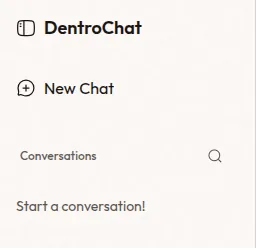
The sidebar lists your chats. New Chat starts a fresh one. On a keyboard, Ctrl+B (Cmd+B on a Mac) shows or hides the sidebar, and Ctrl+Shift+O (Cmd+Shift+O) starts a new chat.
The mode buttons sit just above the message box. The selected mode is filled in. On a phone, the other modes show only as icons.
The account menu is at the bottom of the sidebar. It holds Preferences, Account, Send feedback, What’s new, and Sign out.
If you need help
Send feedback in the account menu opens support. Use it for questions, ideas, and problems, including bugs. Write a subject and a message, and attach up to 5 files of 10 MB each if they help. The team replies in the same conversation and sends you an email.
You can also email hello@dentro.chat if you prefer email, or if you don’t have a DentroChat account yet. Whichever way you write, include what you did, any error text, and when it happened.